Exploring Copilot Studio for Functional Requirements Drafting
A brief exploration of Functional Requirements drafting using Copilot and Copilot Studio.
David Iroaganachi
1/23/20265 min read
Functional Requirements (FR) are a critical aspect of validation. Without them, business needs cannot be reliably translated into testable system behaviour.
In reality, Functional Requirements can be challenging to write well. They are often inconsistent — either too vague, overly detailed, or structured in a way that makes them difficult to review. This can vary significantly depending on who drafts the FR. This lack of consistency is not just a documentation issue — it directly impacts efficiency and overall quality.
With that in mind, I was curious to see what would happen if I built a custom agent in Copilot Studio to assist in transforming raw User Requirements into more structured Functional Requirement drafts, especially given that Copilot is already embedded in day-to-day workflows.
I didn’t go very deep, but it was enough to get a sense of some of its capabilities and features.
This article outlines what I observed.
What Prompting Alone Can Achieve
I tried using longer, well-structured prompts to produce useful results. However, after a few interactions, or once a session ended, I often found that I had to re-enter the prompts to continue drafting, as the context was not always retained. (This does seem to have improved more recently.)
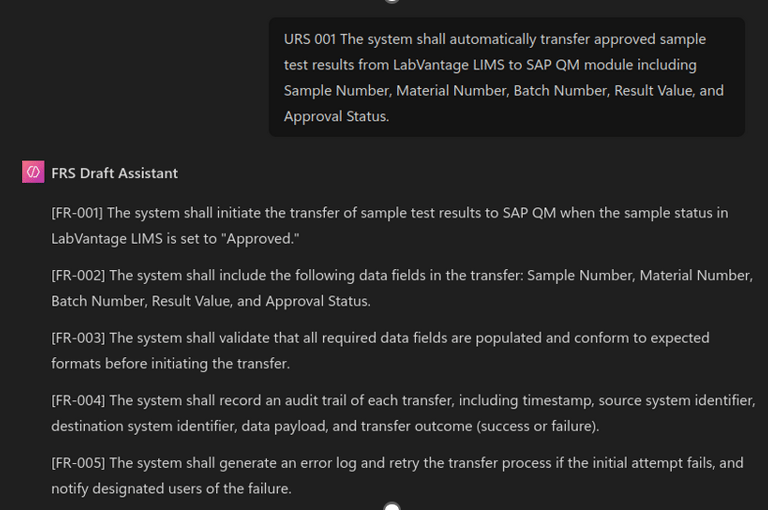
Through some iterative testing, I found that a single structured prompt could be kept in the Copilot Instruction window. I only needed to provide the User Request, and Copilot would generate a Functional Requirement draft.
For more straightforward requirements, this approach appeared to work reasonably well and. However, it still required refinements by copying the output from the Copilot chat into an Excel or Word document to add additional details. (Quite time-consuming, right?)
Why Copilot studio
Copilot Studio is where Copilot moves from being a chat interface to becoming a configurable system — what I’ve previously described as the orchestration layer of the AI stack. This is where workflows, rules, and agent behaviour can be defined, rather than improvised through prompting alone.
The aim was to explore whether an agent could be designed to support the controlled transformation of User Requirements into structured Functional Requirement drafts.
In practical terms, this meant designing an agent that could:
Accept a User Requirement or User Story
Apply transformation logic and examples to generate a formatted Functional Requirement draft
Allow users to review, revise the draft within the same interface (without the need to copy and paste into Excel or Word)
Designing the Copilot Agent for Functional Requirement Drafting
Rather than treating the agent as an “author,” I treated it as a controlled drafting assistant. Its role was not to invent requirements, but to structure and formalise what already existed in the User Requirements.
It was not set up to guess missing information, reinterpret intent, or introduce new functional behaviour. This was explicitly enforced in the prompt.
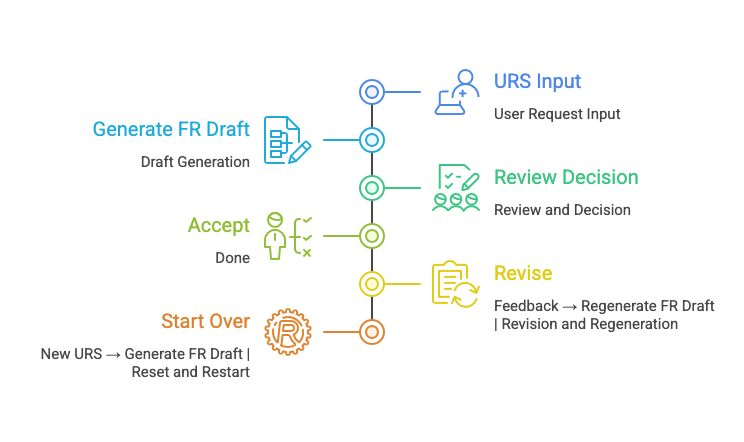
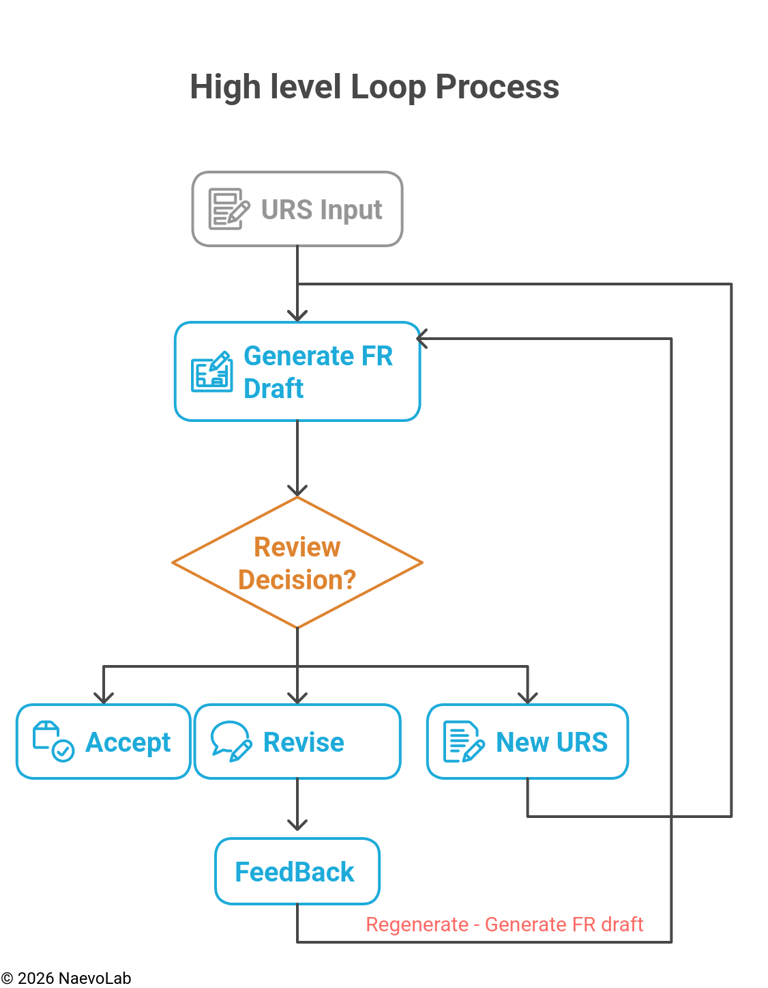
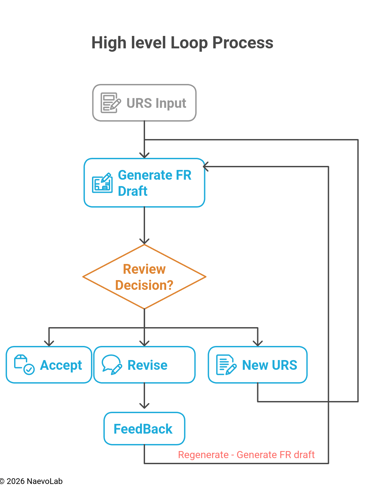
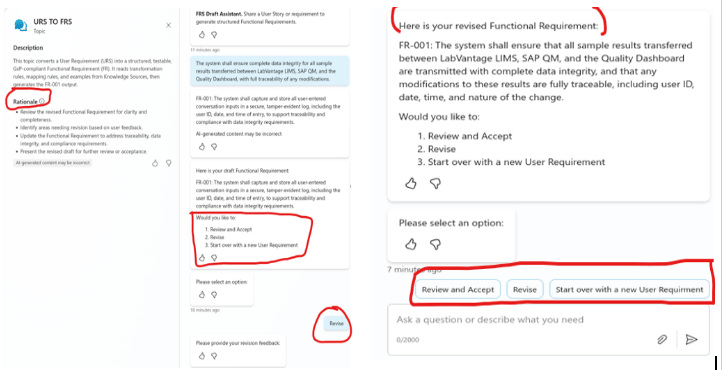
Once the FR draft was generated, the expectation was that the agent would prompt the user to either accept it, revise it, or move on to a new User Requirement.
When the revise option was selected, the user could add any missing information or clarification, and the draft would go through another transformation loop. Those changes were preserved. The agent’s role remained limited to applying structure and formatting only, not altering intent (at least to a certain degree).
All of this was done within the same session, without needing to copy and paste into Word or Excel to revise or add additional details.
What Worked
Several parts of the build behaved as expected and were encouraging. Copilot Studio proved to be a strong orchestration platform for this type of exploration. The visual flow builder made it straightforward to design structured workflows, decision points, and review loops that mapped naturally to validation-style processes.
The review flow in particular aligned well with the human-in-the-loop approach, allowing users to review, revise, or accept drafts in a controlled way.
Variable handling, branching logic, and session control all behaved as anticipated. Overall, the architecture felt sound and made it possible to think in terms of a drafting process rather than a simple chat interaction.
What Went Wrong (The Reality Check)
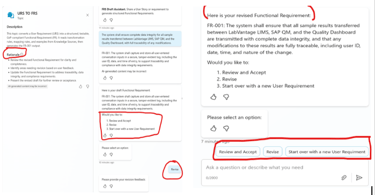
While simpler user requirements worked reasonably well, this began to break down with more complex requirements. The agent would sometimes drift out of context, for example repeating the User Requirement directly as a Functional Requirement instead of transforming it.
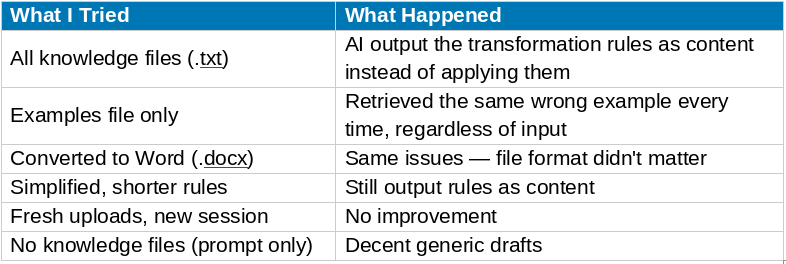
I initially assumed this could be solved by adding a knowledge with examples and regulatory-style material. However, Copilot Studio’s knowledge base did not behave as transformation guidance in a RAG-style sense. In practice, it was unreliable and did not shape the output as expected.
NB: Some of these limitations may also reflect my own learning curve with Copilot Studio and prompt design, rather than the platform itself
Key Take Aways
What Worked in Copilot Studio
Visual flow builder — genuinely well designed
Human-controlled review workflows — easy to implement
Variable management and branching — works as expected
Prompt-based generation — Decent when examples and transformation logic were embedded into prompt.
What Didnt Work
Knowledge file retrieval for transformation use cases
Using uploaded documents as transformation guidance
Consistent and predictable retrieval behavior,regardless of file format
Final Thoughts
Copilot Studio has clear strengths. The orchestration layer, workflow control, and review processes align well with CSV-style workflows, and prompt-based generation can be useful when the right structure and examples are in place. At the same time, it may be less suitable for use cases that require very strict intent, deep context, and highly reliable knowledge retrieval. The goal here was simply curiosity to explore whether tools like this can add value by improving structure and supporting drafting, while still keeping human judgment in control
It also raises an interesting boundary question: if AI is used for drafting, should it sit inside a validated application, especially when most CSV and GxP documentation drafts already lives in tools like Word and Excel, often stored in environments such as OneDrive? Microsoft has achieved ISO/IEC 42001 certification for its AI management systems, which shows governance is being applied at a platform level, but how that translates into specific validation workflows still requires careful thought.
These observations are based on my own exploration, and others may see different results depending on their setup and use case. The curiosity continues.
NaevoLab explores validation and emerging technologies in life sciences through independent, practical insights.
More resources are available at naevolab.com